
🇧🇷 Leia em português: EventBridge Custom Event Bus novo: ainda precisa de SQS FIFO no meio?
You know that cross-team integration diagram? EventBridge up front, an SQS FIFO queue behind every consumer to keep ordering and absorb retries, an archive for the day someone asks for a replay, and a resource policy that grows with every new account. It works, but that's a lot of moving parts just to get an event from one team to another, in order, without losing it.
On September 24, 2026, AWS relaunched the Amazon EventBridge Custom Event Bus. The bus you already know became “Custom Event Bus - Classic”, and the new one ships with sharing through AWS RAM, native retention, replay, ordering by EventGroupId, deduplication at publish time, and per-GB pricing. With all of that inside the bus, can you finally pull SQS FIFO (or Kinesis) out of the middle of your integrations? Let's look at where the answer is yes and where it's no, using the numbers from the docs.
What changes in the new EventBridge Custom Event Bus
Picture an apartment building. With Classic, the building manager (the account that owns the bus) receives all the mail and decides, through hand-written rules, which apartment gets each letter. A new tenant means one more rule. With the new bus, the building got mailboxes: the manager grants access, each tenant installs their own box with their own filter, and they can even ask for last week's letters, because the building keeps everything for a while.
Here's the official comparison:
| Custom Event Bus (new) | Custom Event Bus - Classic | |
|---|---|---|
| Cross-account | AWS RAM; each consumer account owns its subscribers | Resource policy or bus-to-bus |
| Retention | Native, 1 to 365 days (default 1 day) | None; you need an archive |
| Ordering | FIFO per event group, per subscriber | None |
| Replay | Subscriber starting position | Archive replay |
| Publish | PutEvents (JSON) and PutRawEvents (Avro, Protobuf and others) | PutEvents (JSON) |
| Deduplication | At publish, by content or by your own key | None |
| Targets | 1 per subscriber | Up to 5 per rule |
The new building block is the subscriber (think of it as the Classic rule + target pair). It watches a bus, filters, optionally transforms, and delivers to exactly one target, with its own retry policy and DLQ.
In Enterprise Integration Patterns terms, the new bus combines the Publish-Subscribe Channel that EventBridge already was, a Durable Subscriber (the consumer can pause, come back and miss nothing) and a Dead Letter Channel per consumer.
The multi-account design: central bus, per-account subscribers
The use case this launch nails is the cross-team event backbone. A platform account owns the bus, shares it through RAM with accounts, OUs or the whole organization, and then gets out of the way. Each team creates its own subscribers in its own account. A consumer account only sees its own subscribers; the owner sees all of them and can revoke any of them with RevokeResource.
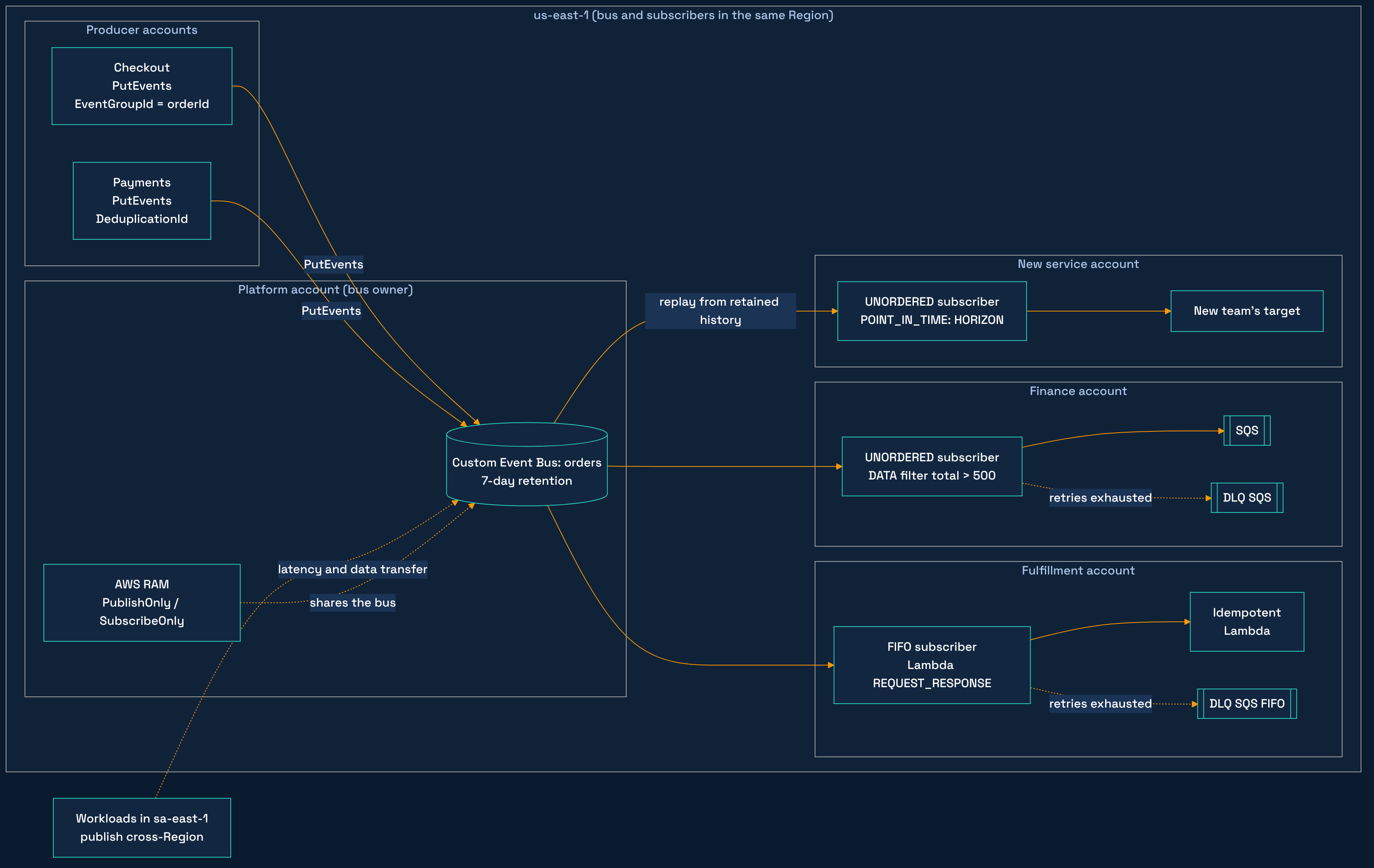
RAM ships four managed permissions (publish, subscribe, event sources, or all three), such as AWSRAMEventBridgeEventBusV2PublishOnly and AWSRAMEventBridgeEventBusV2SubscribeOnly. That gives you least-privilege by role: checkout only publishes, finance only subscribes. This lands squarely on the Security pillar of the Well-Architected Framework: permissions move out of a hand-written resource policy and into an auditable share.
Hands-on. In the platform account, create the bus with 7 days of retention and share it with a consumer account (commands from the official docs, with their example IDs):
aws eventsv2 create-event-bus \
    --name orders \
    --storage-configuration RetentionPeriodInDays=7

aws ram create-resource-share \
    --name orders-bus-share \
    --resource-arns arn:aws:events:us-east-1:111122223333:event-busv2/orders/EXAMPLE1234567890abcdef \
    --principals 444455556666 \
    --permission-arns arn:aws:ram::aws:permission/AWSRAMEventBridgeEventBusV2SubscribeOnly
Notice the eventsv2: the CLI, the SDK (EventBridgeV2) and the endpoint all got the suffix, and the CloudFormation namespace is AWS::EventsV2. In IAM, though, actions keep the events: prefix. A policy with eventsv2:PutEvents passes validation, grants nothing, and the caller gets an AccessDeniedException.
In the consumer account, here's the subscriber in CloudFormation. It's a snippet of the official template (AWS::EventsV2::Subscriber), with the bus ARN coming in as a parameter, because exports don't cross accounts:
Parameters:
  OrdersBusArn:
    Type: String

Resources:
  LargeOrders:
    Type: AWS::EventsV2::Subscriber
    Properties:
      Name: large-orders
      EventBusArn: !Ref OrdersBusArn
      FilterConfiguration:
        Filters:
          - Scope: DATA
            Pattern: '{"detail":{"total":[{"numeric":[">",500]}]}}'
      InvokeConfiguration:
        TargetArn: !GetAtt OrdersQueue.Arn
        RoleArn: !GetAtt DeliveryRole.Arn
      RetryPolicy:
        MaxRetryAttempts: 10
        MaxEventAgeInSeconds: 3600
      OnFailureConfiguration:
        Arn: !GetAtt OrdersDeadLetterQueue.Arn
The queue, the DLQ and the role (with sqs:SendMessage on both) live in the same template, because the subscriber's RoleArn must belong to the same account as the subscriber. The result: one stack in the owner account and one in each consumer account, and routing stops being a ticket queue for the platform team.
Two limits will bite your IaC pipeline: only 1 subscriber create or delete in progress per bus, across all accounts (the second one gets ConcurrentModificationException), and at most 24 filter changes per subscriber in 24 hours. With ten teams on the same bus, add retry with backoff to the pipeline.
Retention and replay: the archive became a starting position
On the new bus, every event is retained for the configured period, and a replay is just a subscriber that starts in the past. --starting-position takes LATEST or POINT_IN_TIME, with HORIZON (the oldest retained event) or TIMESTAMP, plus an optional EndPoint to stop.
Two use cases get easy. Hydrating a new service: the subscriber starts at HORIZON, receives the last N days and then rolls into the live flow. And surgical redrive, like this example from the docs, which reprocesses only two aws:EventId values from a one-minute window:
aws eventsv2 create-subscriber \
    --name redrive-2026-09-16 \
    --event-bus-arn arn:aws:events:us-east-1:111122223333:event-busv2/orders/EXAMPLE1234567890abcdef \
    --starting-position POINT_IN_TIME \
    --point-in-time-configuration '{ "PointType": "TIMESTAMP", "StartingPoint": "2026-09-16T18:40:00Z", "EndPoint": "2026-09-16T18:41:00Z" }' \
    --filter-configuration '{ "Filters": [ { "Scope": "SYSTEM_METADATA", "Pattern": "{\"aws:EventId\":[\"a1b2c3d4-...\",\"e5f6a7b8-...\"]}" } ] }' \
    --invoke-configuration '{ "TargetArn": "arn:aws:sqs:us-east-1:111122223333:large-orders", "RoleArn": "arn:aws:iam::111122223333:role/EventBusDeliveryRole" }'
Every delivered event carries aws:DeliveryType set to LIVE or REPLAY. That helps, but your consumer has to be an Idempotent Receiver regardless (in a Lambda function, the idempotency utility from Powertools for AWS Lambda is the shortest path). Also, the number of subscribers replaying at the same time is limited per bus, with no published value: the “everyone reprocesses after the incident” moment will hit LimitExceededException.
Ordering by EventGroupId and deduplication: what the guarantee covers
A subscriber has a Type of UNORDERED (parallel, higher throughput) or FIFO. With FIFO, events sharing the same SystemMetadata.EventGroupId arrive in the order they were published. EventGroupId plays the role of the SQS FIFO MessageGroupId (or the message key, if you come from Kafka).
Deduplication happens at publish time, within a fixed 5-minute window, either by content (DeduplicationType=CONTENT_BASED) or by your own key in SystemMetadata.DeduplicationId. Prefer the key: content-based deduplication is billed as a separate operation. A suppressed duplicate comes back with SuccessCode: DEDUPLICATED, and you treat it as success.
AWS calls this combination “exactly-once ingestion”. Let me give it to you straight: the word that matters there is ingestion. Deduplication covers producer retries within 5 minutes. The consumer that crashed after writing and before acknowledging, and the replay you triggered yourself, are on you: consumer-side idempotency is still mandatory.
On a shared bus, an event group belongs to the account that published it. Two accounts publishing to the shared bus with the same EventGroupId form two separate groups, with no ordering between them and no shared throughput. If “order 123” gets events from checkout (account A) and from payments (account B), the bus doesn't guarantee that PaymentConfirmed arrives after OrderPlaced. Ordering across teams is still a design problem you own: a single publisher per aggregate, or a consumer that tolerates out-of-order events.
The trade-offs, with numbers: where FIFO on the bus hurts
Head-of-line blocking within a group
On a FIFO subscriber, a failing event holds back the following events in the same group while it's being retried (other groups keep flowing). SQS FIFO behaves the same way per message group, so the bus didn't invent this problem. On the bus, the window is controlled by the subscriber's RetryPolicy, and the docs sum up the dilemma: a long retry window keeps the group in order, and every event behind the failing one pays for it in latency.
A 30-second ceiling on synchronous waits
For real ordering with Lambda, the docs tell you to use the REQUEST_RESPONSE InvocationType; with EVENT, ordering only holds until delivery to Lambda's asynchronous queue. InvocationTimeoutSeconds goes from 1 to 30 seconds, a hard ceiling. Anything that takes longer doesn't fit. Step Functions Standard is out too, because REQUEST_RESPONSE calls StartSyncExecution, which only Express state machines support. With SQS FIFO in the middle, the consumer pulls at its own pace, with a visibility timeout of up to 12 hours.
Per-event-group throughput limit
Ingestion per event group is 1,500 per second, counting the number of events plus their total size in KB, and it's not adjustable. By that formula, a 2 KB event consumes 3 units, which works out to about 500 events per second per group. A group per customer or per order will rarely get there; a “global” group to force total ordering will get there fast.
Retries behave differently from Classic
A subscriber defaults to MaxRetryAttempts 5 and MaxEventAgeInSeconds 300. A Classic target had 185 attempts and 24 hours. If you relied on a full day of retries, set MaxEventAgeInSeconds to 86,400 explicitly, or any target outage longer than 5 minutes sends everything to the DLQ. With no DLQ, the event is dropped and your only clue is the EventsDropped metric. Without sqs:SendMessage on the role, the OnFailureDestinationFailed metric ticks up and the event is lost as well. On FIFO, the DLQ must be an SQS FIFO queue.
Two details break handlers during migration. Without BatchConfiguration (or with a MaxBatchSize other than 1), Lambda receives a JSON array, even for a single event. With an SQS FIFO target, SqsParameters.MessageDeduplicationId must be derived per message with JSONata; a constant value makes the queue discard everything after the first message.
It's not streaming: where Kinesis and MSK fit
Retention, replay and ordering make the bus look like a log. My take: it's still an integration bus, now with memory, and streaming is a different problem. On the bus, each subscriber filters event by event and gets a push into a single target. With Kinesis Data Streams and Amazon MSK, consumers read per shard or partition at their own pace, and the conversation is about throughput, aggregation and time windows with Flink. Telemetry, clickstream and CDC for analytics remain streaming workloads. For that side of the map, I wrote about Kinesis, Firehose, Flink or MSK.
What the new bus competes with is the Kinesis stream that ended up “in the middle” for lack of a better option, just to get ordering and replay between microservices.
What about the bill? Per GB versus per event
The pricing unit changed. From the pricing page (which doesn't state which Region the prices refer to): ingress at $0.18 per GB for the first 5,000 GB and $0.12 after that, egress at $0.05 per GB delivered to each subscriber (retries are billed the same way), storage beyond the default retention, and evaluation (JSONata, schema validation) at $0.15 per million, only when configured. Each event rounds up to the next 1 KB. On Classic: $1.00 per million custom events (in 64 KB chunks), free delivery within the same account, and $1.00 per million for delivery to another bus.
Let's run the numbers per million events, in the first tier, with no evaluation and no extra retention. To get the unit right, I redid the official example (1,000 events per second at 2 KB, 30-day month): ingress matches the page's $922 using decimal GB. So 1 million events of S KB equals S GB.
Scenario 1, same account, 2 subscribers. New: 0.18 × S + 2 × 0.05 × S = 0.28 × S. Classic: $1.00. At 1 KB the new bus costs $0.28; at 3 KB, $0.84; at 4 KB, $1.12, already above Classic.
Scenario 2, cross-account, 1 producer and 3 consumer accounts. Classic with bus-to-bus: $1.00 for ingestion plus $1.00 per target bus, $4.00 counting only those items. New: 0.18 × S + 3 × 0.05 × S = 0.33 × S, or $0.66 at 2 KB. Break-even sits around 12 KB.
These numbers are illustrative: redo them with your own average payload and subscriber count. The full official example (2 subscriptions, one with JSONata, schema validation, 7 days of retention and 1% failures with 3 retries) comes to $2,317 per month, of which $778 is evaluation. Evaluation alone is a third of the bill. That's the Cost Optimization pillar of the Well-Architected Framework in practice: measure before you turn a feature on.
Running in São Paulo? No sa-east-1 (yet)
It's not all sunshine and rainbows. The launch covered 14 Regions: N. Virginia, Ohio, Oregon, Ireland, Frankfurt, Stockholm, Spain, Tokyo, Singapore, Sydney, Malaysia, Thailand, Mumbai and Hong Kong. São Paulo was left out, and the sharing docs say the bus and the consumer's subscribers live in the same Region and partition.
I'm based in Brazil, so this one hits close to home, and the same reasoning applies to any Region not on that list. With workloads in sa-east-1, adopting the new bus today means publishing cross-Region to us-east-1 (or another of the 14): latency, cross-Region data transfer and, if a contract or internal policy requires data to stay in Brazil, a data residency discussion (LGPD, Brazil's data protection law, similar to GDPR, doesn't forbid international transfers, but it does set conditions for them, so legal will want a say). I couldn't find confirmation in the docs that a subscriber can target another Region, so I'd plan for the consumer side to live there as well. If you picked São Paulo because of a requirement, stay on Classic with SQS FIFO. And if the idea is to spread across Regions for availability, it's worth rereading the price of multi-Region resilience before moving your event backbone away from its consumers.
Decision table: Classic, new bus or SQS FIFO
| Situation | Classic | New bus | SQS FIFO in the middle |
|---|---|---|---|
| Workload in sa-east-1 with a Region requirement | Yes | Not available yet | Yes |
| Many accounts, each team owns its routing | Possible, with policy and bus-to-bus | Best fit (RAM + per-account subscriber) | One queue per consumer, more parts |
| Per-entity ordering, same publisher | None | FIFO by EventGroupId | Yes, by MessageGroupId |
| Ordering across different producer accounts | None | Not guaranteed (groups are per account) | Only if everyone publishes to the same queue |
| Ordered consumer that takes longer than 30 s | Not applicable | Doesn't fit REQUEST_RESPONSE | Yes, visibility timeout up to 12 h |
| Replay and hydrating a new service | Archive + replay | Native, up to 365 days | No replay (retention up to 14 days) |
| Events of 4 KB or more, same account, few subscribers | Cheaper | More expensive per GB | Depends on volume |
| High-volume analytics with time windows | No | No | No (that's Kinesis or MSK) |
So, do you retire it? For a cross-team event backbone, in one of the 14 Regions, with fast idempotent consumers and per-entity ordering within a single publisher, I'd take SQS FIFO out of the middle, yes. The AWS News Blog itself says synchronous mode removes the need for SQS between the bus and Lambda for reliability. Outside that scope, the queue still earns its place. And stacking services for symmetry has an availability cost, as I discussed in the post on multi-cloud and availability. There's no silver bullet, only the right scope.
What you take away
- The new bus combines Publish-Subscribe, Durable Subscriber and a per-consumer DLQ, with RAM sharing, retention from 1 to 365 days and replay through starting positions.
- Ordering is per
EventGroupIdand per publishing account. Across different teams, the bus won't order events for you. - FIFO has a price: head-of-line blocking during retries, a 30 s ceiling on
REQUEST_RESPONSE, Step Functions Express only, and 1,500 units per second per group. - Migrating from Classic? Revisit retries (default of 5 attempts and 300 s), configure a DLQ, use
events:in IAM and update handlers to expect an array. - Per-GB pricing favors small events and many consumer accounts. And with no sa-east-1, anyone who needs data in São Paulo stays on Classic with SQS FIFO.
So, are you already designing the new bus in your organization, or waiting for it to reach your Region? Tell me in the comments; it's a conversation I'd love to bring to the AWS User Group São Paulo too. If this post helped, drop a like and share it around. Thanks a lot!
Sources
- What's New: Amazon EventBridge relaunches event buses for enterprise scale (Sep 24, 2026)
- AWS News Blog: enhanced custom event buses in Amazon EventBridge
- Docs: What is the EventBridge Custom Event Bus?
- Docs: sharing through AWS RAM
- Docs: ordering and deduplication
- Docs: retries and DLQ
- Docs: Lambda target
- Docs: CloudFormation
- Docs: Custom Event Bus quotas
- Amazon EventBridge pricing
- Docs: Amazon SQS message quotas
BUILD. SCALE. REPEAT. =D