🇧🇷 Leia em português: Lambda MicroVMs: shell na Lambda, lifecycle hooks e as best practices que importam
Let me tell you about a scene anyone from the infra side will recognize right away. When Lambda showed up back in 2014 and started spreading, infrastructure folks would come over and ask: "OK, but how do I connect to the Lambda to check it's running? Run a ps, a tail, look at the app from the inside?". And the answer was always the same: you don't. A function is a black box, you look at CloudWatch and pray.
Well, with Lambda MicroVMs you can now attach a real shell. =D In this post I show how to open that shell, how to implement in Node the lifecycle hooks that keep the MicroVM healthy, and the official best practices for performance, security and cost.
Connecting a shell to a Lambda MicroVM
There are two ways in. In the console, you select the MicroVM and click Connect. From the CLI, you generate a shell token and connect:
aws lambda-microvms create-microvm-shell-auth-token \
  --microvm-identifier <id> --expiration-in-minutes 30

# once inside, list the tasks and exec into one:
ctr task ls
ctr task exec -t --exec-id shell <id> /bin/sh
Shell is opt-in. The MicroVM has to be launched with the SHELL_INGRESS network connector, and if it came up without it, create-microvm-shell-auth-token returns a ValidationException. Connectors are set on run-microvm and don't change while the MicroVM is running, so you decide at launch time which MicroVMs accept that way in.
For the rest of your debugging, three fields help a ton: terminationMessage on get-microvm (for a MicroVM that died), the build logs in CloudWatch under /aws/lambda-microvms/<image-name>, and StateReason when a network connector lands in FAILED.
Lifecycle hooks: what keeps the MicroVM standing
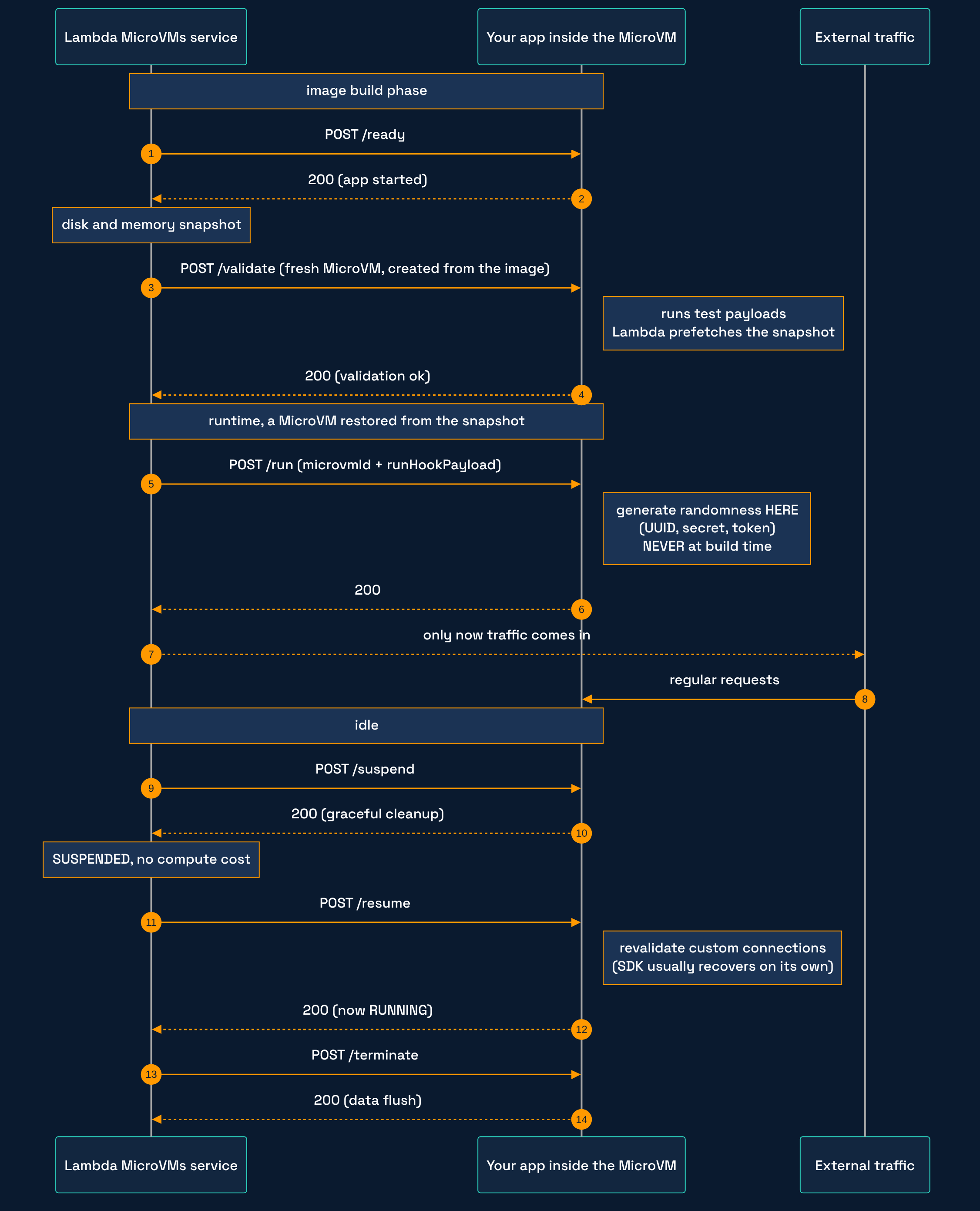
Remember the snapshot caveat (the MicroVM boots from a frozen state, so anything that needs to be fresh can't be frozen)? AWS handles it with lifecycle hooks: four HTTP endpoints your app implements, which the service calls with a POST at the right moment.
/run: post-initialization. This is where you generate UUIDs, secrets and random values, never at image build time, or every MicroVM is born with the same “random”. Use a CSPRNG./runalso receives in its body therunHookPayload(per-MicroVM config, such as a tenant ID, in a string of up to 16 KB that you pass with--run-hook-payloadonrun-microvm) and themicrovmId, which Lambda injects./suspend: graceful cleanup before suspending (flush pending writes, close connections, release resources)./resume: revalidates connections and cached state. AWS SDK connections usually recover on their own; custom connections may not, so check them here. The MicroVM staysSUSPENDEDwhile this hook runs and only flips toRUNNINGonce it returns 200./terminate: flushes data before shutting down. It only runs on final termination; before a suspend,/suspendis the one doing the work.
The hooks arrive on the path /aws/lambda-microvms/runtime/v1/<hook>, on a port you configure, and external traffic only starts flowing after /run returns 200. If /run fails or times out, the MicroVM can go straight to TERMINATING without ever reaching RUNNING, so handle errors and timeouts inside the hook.
About the port: the docs don't tell you to split hooks and app, and in the example below both share 8080, the default port for external traffic. Make that call on purpose, looking at which ports the access token opens through allowedPorts.
There are also two hooks for the image build phase. /ready returns 200 once the app has finished starting, and that's when the service takes the disk and memory snapshot (while you're not ready, return 503 right away and Lambda keeps retrying until the timeout). /validate is called after the build, on a fresh MicroVM created from the image: that's where you run test payloads that exercise your code paths, and Lambda tracks which snapshot regions were touched so it can prefetch them and cut startup latency. So /ready makes sure the snapshot captures an app that's ready to serve, and /validate is the one that speeds up boot.
In our Node HTTP server it looks like this:
const http = require("http");
const crypto = require("crypto");

let sessionSecret; // generated in /run, NEVER at image build time

function ok(res, body) {
  res.writeHead(200, { "Content-Type": "application/json" });
  res.end(JSON.stringify(body));
}

const server = http.createServer((req, res) => {
  const HOOK = "/aws/lambda-microvms/runtime/v1";
  switch (req.url) {
    case `${HOOK}/run`:        // randomness and init live here; return 200 before traffic comes in
      sessionSecret = crypto.randomUUID();
      return ok(res, { ready: true });
    case `${HOOK}/suspend`:    // cleanup before freezing
      return ok(res, { cleanedUp: true });
    case `${HOOK}/resume`:     // revalidate connections/state on wake-up
      return ok(res, { revalidated: true });
    case `${HOOK}/terminate`:  // flush data on shutdown
      return ok(res, { flushed: true });
    default:
      // ... your actual application
      return ok(res, { hello: "world" });
  }
});

server.listen(8080, "0.0.0.0");
If the app stops answering after a resume, suspect number one is a missing /resume (or the app not binding to the right port, like 8080, after it wakes up).
Quick proof: the snapshot freezes your “random”
That warning about generating randomness in /run sounds like a detail until you measure it. I put together a small demo that runs locally, on my machine: no AWS, no cost, just the Node stdlib. It simulates the build producing the snapshot and boots two “MicroVMs” from it. The code ships with the demo post, the series finale.
The output, captured for real:
== 3. antes do /run: o servico nao entrega trafego ==
amostra-A  GET /  -> HTTP 503

== 5. depois do /run 200: trafego liberado ==
amostra-A  GET /  -> HTTP 200

== 6. veredito ==
token gerado no BUILD  A vs B: IGUAL     <- colide entre analises
   A: 6fcf9c71-2024-4901-acfb-2593ed5a2fbb
   B: 6fcf9c71-2024-4901-acfb-2593ed5a2fbb
token gerado no /run   A vs B: diferente <- ok
   A: 2011db3c-3120-4b9a-b89d-caa48b034c8f
   B: 496f5bfc-7c7f-4cd7-b39f-2ea3c9b8c281
(The demo prints in Portuguese: “antes do /run” is before /run, “IGUAL” is identical, “diferente” is different.) You can see both things in the same output: the token baked at build time comes out identical in both, and traffic only gets a 200 after /run responds.
Heads up: this demo does not run on Lambda MicroVMs. It exercises the hooks contract locally, with a snapshot.json standing in for the real freeze. It's there to show the behavior. Proof on the real service only comes from running on a MicroVM in AWS, and that's for the demo post, the series finale.
Official best practices, by pillar
Performance. Pick the smallest MicroVM that covers your CPU, memory and bandwidth (bandwidth scales with configured memory). Keep the snapshot lean: strip build dependencies and temp files before the image is captured, which cuts run and resume time. And for latency-sensitive workloads, keep your most-used environments suspended so they resume fast.
Security. Issue short-lived tokens (15 to 30 min) and have refresh logic on the client before they expire. Scope the token to the ports the app actually uses, with the allowedPorts parameter. Sensitive traffic (database, internal API) goes through a VPC egress connector, which goes through your security groups and network ACLs. And apply least-privilege: split the build role (image creation) from the execution role (runtime), each with the bare minimum. Handy detail: /ready and /validate run under the build role, and the runtime hooks run under the execution role.
Cost. Set maxIdleDurationSeconds in the idle policy to suspend idle MicroVMs (a suspended MicroVM pays no compute, only snapshot storage). Put a safety ceiling with the maximum duration (--maximum-duration-in-seconds in the CLI, up to 8 hours, counting running plus suspended time) so a forgotten instance doesn't surprise you on the bill. Use suspendedDurationSeconds to automatically terminate a MicroVM that sat parked for too long. Tag your images for cost allocation in Cost Explorer, and delete image versions you no longer use, because they cost storage too.
Before you decide how much isolation and availability your use case needs, it's worth looking at the price of each step up. I ran those numbers in High availability has a price: resilience is a decision, not a stack.
Browser apps: a proxy in front of the MicroVM
An app that runs in the browser (a VS Code server, a web IDE) runs into a rule in the docs: every request to the MicroVM endpoint needs the JWE token in the X-aws-proxy-auth header, and there's no unauthenticated option. When the user opens a URL, clicks a link or loads an iframe, the browser won't let you set that header. For a WebSocket opened by your own JavaScript, the docs let you pass token and port as subprotocols (lambda-microvms.authentication.<token>), but that doesn't cover regular navigation.
The architecture answer is a reverse proxy of your own in front (the Gateway pattern): a component that takes the browser request already authenticated the way your app does it, fetches or mints the MicroVM token, and injects X-aws-proxy-auth before forwarding. It also needs a user → MicroVM map, because each MicroVM has its own endpoint and there's no load balancing across them. With that map, when the user closes the tab and comes back later, you know which instance to route to. The orchestrator that already calls run-microvm is a natural place to keep that map.
If all you need is a custom domain, AWS published a pattern with an Application Load Balancer rewriting the Host header, but there the client still has to send the token. It doesn't replace the auth proxy.
If what's orchestrating these MicroVMs is an AI agent operating your account, the other side of the coin is permission control, which I covered in AWS MCP Server: which one to use, when, and how to set it up.
The errors you'll see (and what to do)
From the troubleshooting table in the docs, these are the ones I'd keep at hand:
- 502 Bad Gateway: the app crashed or isn't listening. Check the
EXPOSEandCMDin your Dockerfile and the runtime logs. With auto-resume on, it can also be a MicroVM that failed to resume (check its state withget-microvm). - 429 Too Many Requests: you went over the rate (account or MicroVM). Retry with exponential backoff and jitter.
- Dropping connections: idle timeout. Implement keepalive (ping/pong) or raise
maxIdleDurationSeconds. - Build failed (
CREATION_FAILED): look at the logs under/aws/lambda-microvms/<image-name>, check your Dockerfile syntax and the build role's S3 permissions. Rundocker buildlocally to reproduce.
And for basic monitoring: when a MicroVM terminates out of nowhere, get-microvm returns a stateReason with the cause. That's the first place to look.
What you take away
- You can shell into Lambda now, via the console or
create-microvm-shell-auth-token, but only if the MicroVM was launched with theSHELL_INGRESSconnector. - The lifecycle hooks (
/run,/suspend,/resume,/terminate) are what keep the MicroVM healthy. Generate randomness in/run, revalidate connections in/resume, and use/validateto shorten boot time. - Security: short-lived tokens with refresh, per-port scope, VPC egress, and a build role separate from the execution role.
- Cost: suspend when idle, cap the duration, terminate what sat parked, and clean up image versions you don't use.
Sources
- Best practices for Lambda MicroVMs
- Core concepts (states and transitions)
- Running and using MicroVMs (lifecycle hooks, run hook payload, suspend/resume)
- MicroVM images (build hooks
/readyand/validate) - Security and permissions (IAM roles, tokens, shell)
- Networking (authentication, ports, VPC egress)
- Troubleshooting
- Adding custom domains to AWS Lambda MicroVMs with Application Load Balancer
Running a MicroVM use case already? Tell me which hook saved you (or burned you for not having it). And if you're from the infra side and always wanted to shell into a Lambda, now's your moment. If this post helped, drop a like and share it around. Thanks a lot!
BUILD. SCALE. REPEAT. =D